Networks can be organized in different ways depending on how devices share resources and how users are managed. Two common network models are peer-to-peer networks and client-server networks.
A peer-to-peer network allows devices to share resources directly with one another. A client-server network uses centralized servers to provide resources and services to client devices. Both models allow users to communicate and share information, but they differ significantly in management, security, scalability, reliability, and cost.
Understanding these differences helps an IT technician determine which network model is appropriate for a home, small business, school, or large organization.
What Is a Peer-to-Peer Network?
A peer-to-peer network, commonly abbreviated as P2P, is a network in which connected devices can share resources directly with one another without relying on a dedicated central server.
Each computer in a peer-to-peer network can function as both a client and a server. A computer acts as a client when it requests a resource from another device. It acts as a server when it provides a file, printer, or other resource to another device.
For example, one computer may share a folder containing documents. Another computer may share a printer. Users connect directly to the computer hosting the resource.
Peer-to-peer networking is commonly used in homes, temporary workgroups, and very small businesses that do not require centralized management.
Peer-to-Peer Network Example
Consider a small office with four computers. One computer has a USB printer connected to it, and another stores documents that the employees need to share.
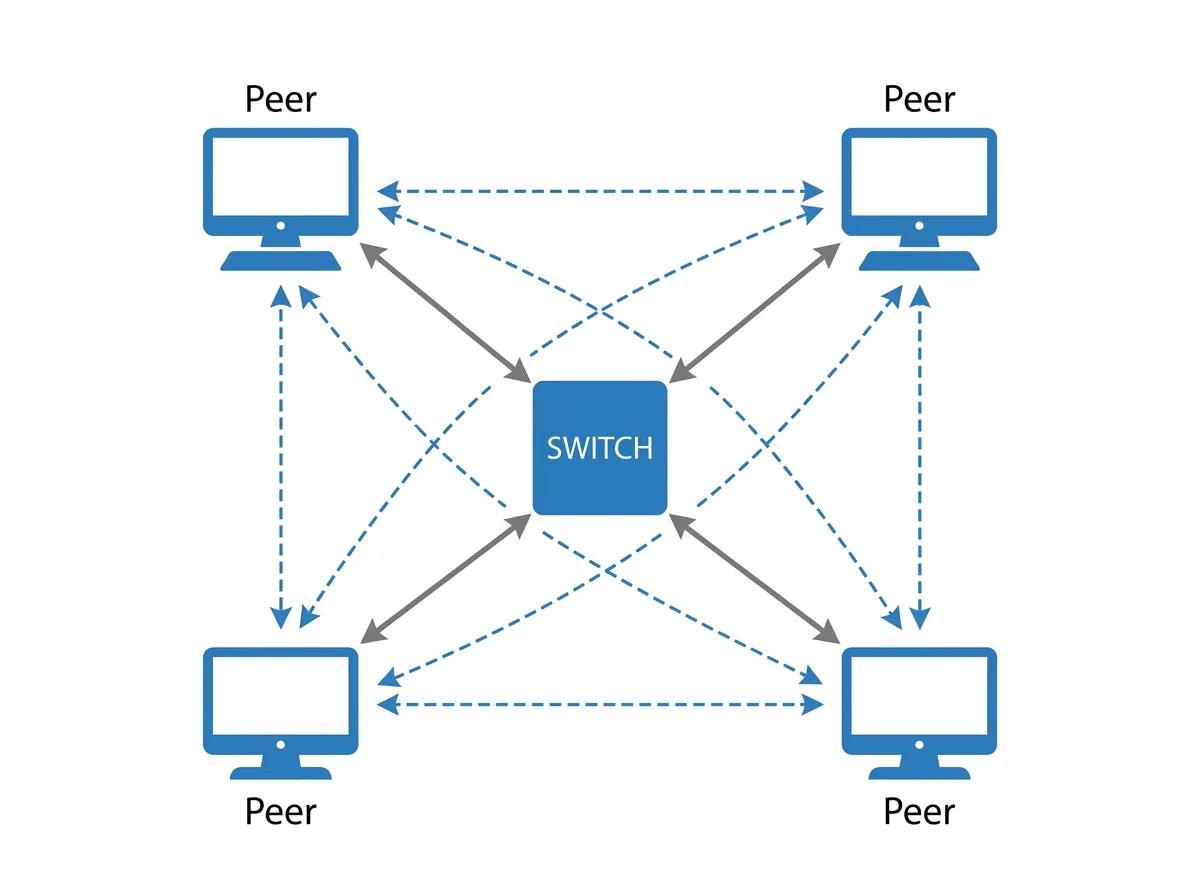
The printer can be shared through the first computer. The document folder can be shared through the second computer. The remaining devices connect directly to those computers when they need to print or access files.
No dedicated server is required. Each computer is responsible for managing its own users, permissions, updates, security settings, and shared resources.
This arrangement may work well for a very small office, but it becomes harder to manage as more users and devices are added.
What Is a Client-Server Network?
A client-server network is a network in which dedicated servers provide services and resources to client devices.
Client computers send requests to a server, and the server processes those requests. The server may provide file storage, printing, authentication, databases, websites, email, backups, or other services.
A server is normally designed to remain available for long periods and support multiple users at the same time. It may include more memory, storage, processing power, network interfaces, and redundant components than a standard desktop computer.
Client-server networks are commonly used in businesses, schools, hospitals, government organizations, and other environments that require centralized control.
Client-Server Network Example
Consider a company with 150 employees.
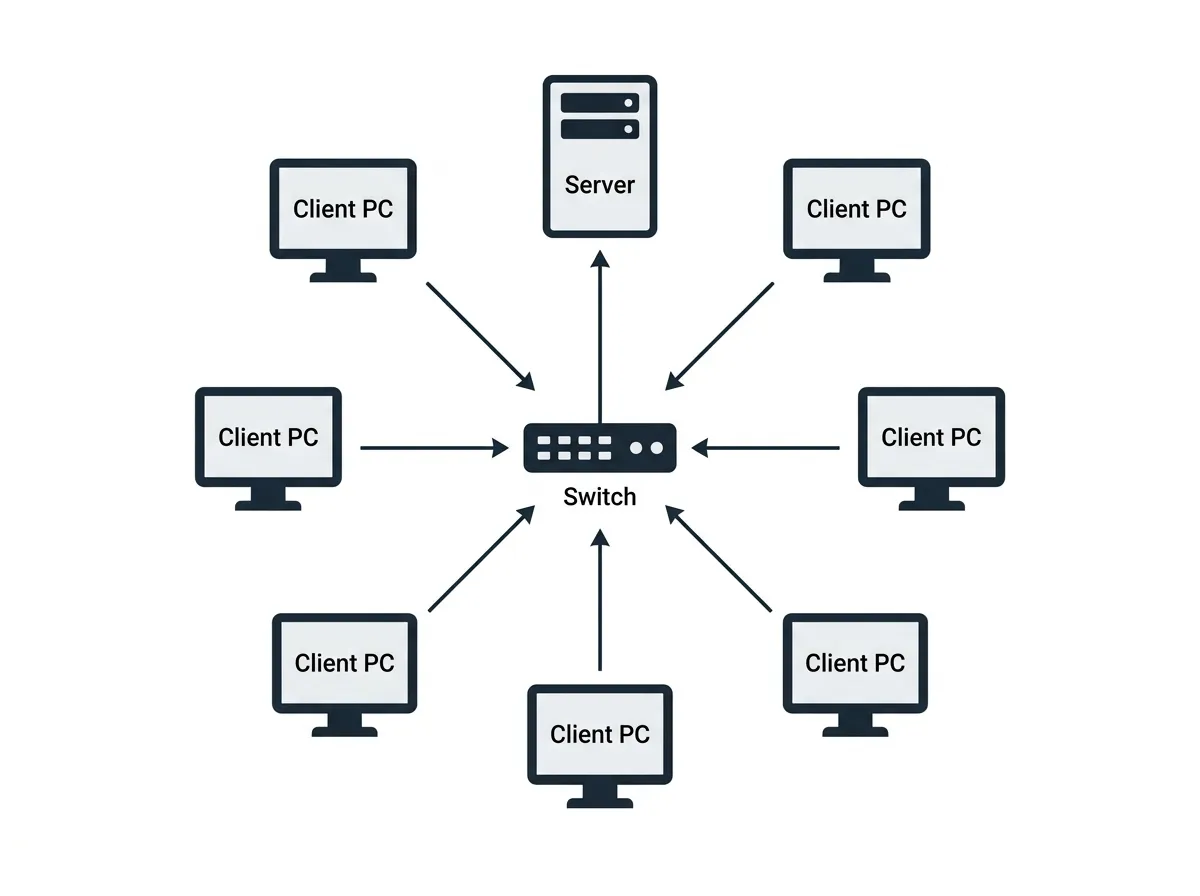
Instead of storing shared documents on individual workstations, the company uses a file server. Employees sign in using centrally managed accounts and access folders based on their permissions.
The company may also use an authentication server to manage usernames and passwords, a print server to manage shared printers, and a backup server to protect important data.
The users’ computers act as clients. The servers provide the resources and services required by those clients.
Because management is centralized, an administrator can create accounts, apply security policies, assign permissions, install updates, and monitor activity from a central location.
The Role of Clients
A client is a device or application that requests a service from another system.
In a client-server network, common clients include desktop computers, laptops, smartphones, tablets, thin clients, and business applications.
For example, a user’s computer acts as a client when it requests a file from a file server. A web browser acts as a client when it requests a webpage from a web server. An email application acts as a client when it connects to a mail server.
Clients normally depend on servers for specific services. If the server providing a service becomes unavailable, the clients may temporarily lose access to that resource.
The Role of Servers
A server provides services or resources to clients.
A single physical server may perform one role, or it may support several roles. Virtualization also allows one physical system to host multiple virtual servers.
Common server roles include:
File server
Print server
Web server
Mail server
Database server
Authentication server
Backup server
Application server
Servers are typically managed by network or systems administrators. Access is restricted, and the server may be stored in a secure server room or data center.
Centralized vs. Decentralized Management
One of the largest differences between peer-to-peer and client-server networks is how they are managed.
Peer-to-peer networks use decentralized management. Each device is configured separately. User accounts, passwords, shared folders, permissions, updates, and security settings may need to be managed individually.
Client-server networks use centralized management. Administrators can manage users, computers, security policies, and shared resources from central systems.
For example, an administrator in a client-server environment may disable one user account and immediately prevent that person from accessing multiple computers and network resources. In a peer-to-peer network, the administrator may need to remove or disable the account separately on every computer.
Centralized management becomes increasingly valuable as an organization grows.
User Accounts in a Peer-to-Peer Network
In a peer-to-peer environment, user accounts are usually stored locally on each computer.
Suppose an employee needs access to shared folders on three different computers. The employee may need a local account on each device. If the employee changes a password, the password may need to be updated separately on every computer.
If the employee leaves the organization, an administrator must locate and remove the account from every device where it was created.
This process can become difficult and may lead to inconsistent access or forgotten accounts.
User Accounts in a Client-Server Network
In a client-server environment, user accounts can be stored in a central directory service.
The user signs in using one centrally managed account. That identity can be used to access computers, files, printers, applications, email, and other resources.
Administrators can apply password requirements, login restrictions, permissions, and security policies to groups of users.
For example, members of the accounting department may receive access to financial folders, while members of the marketing department receive access to design files.
Centralized identity management improves consistency and reduces administrative work.
Security in Peer-to-Peer Networks
Peer-to-peer networks can provide basic security, but the security settings are managed separately on each device.
Each user or device owner may be responsible for creating accounts, choosing passwords, setting folder permissions, installing updates, and configuring antivirus software.
This can result in inconsistent security. One computer may use a strong password and current updates, while another may use a weak password and outdated software.
Shared resources may also be accidentally configured with permissions that are too broad. A user might share an entire drive when only one folder was intended to be available.
Peer-to-peer networks are most suitable when the number of users is small and the information being shared is not highly sensitive.
Security in Client-Server Networks
Client-server networks provide stronger centralized security controls.
Administrators can enforce password requirements, account lockout policies, access permissions, software restrictions, encryption, firewall settings, and update policies.
Servers can also create centralized logs that show login attempts, file access, security events, and administrative changes.
A client-server network can use role-based permissions. Users receive access according to their job responsibilities rather than configuring access individually on each computer.
However, centralized systems must be properly secured.