The Dynamic Host Configuration Protocol (DHCP) is a network management protocol that automatically assigns IP addresses and other network configuration parameters to devices on a network. Without DHCP, network administrators would need to manually configure every device that connects to the network—an impractical task in modern environments where dozens, hundreds, or even thousands of devices require network access.
DHCP operates on a client-server model. When a device connects to a network, it broadcasts a request for configuration information, and a DHCP server responds with the necessary settings. This automation dramatically reduces administrative overhead and minimizes configuration errors.
Why DHCP Matters for IT Professionals
DHCP is essential knowledge for several reasons. First, nearly every network relies on DHCP for automatic IP address assignment. Second, DHCP misconfigurations are a common source of connectivity problems. Third, understanding DHCP is necessary for network planning and IP address management. Finally, DHCP concepts appear frequently on the CompTIA A+ exam, particularly in troubleshooting scenarios.
How DHCP Works
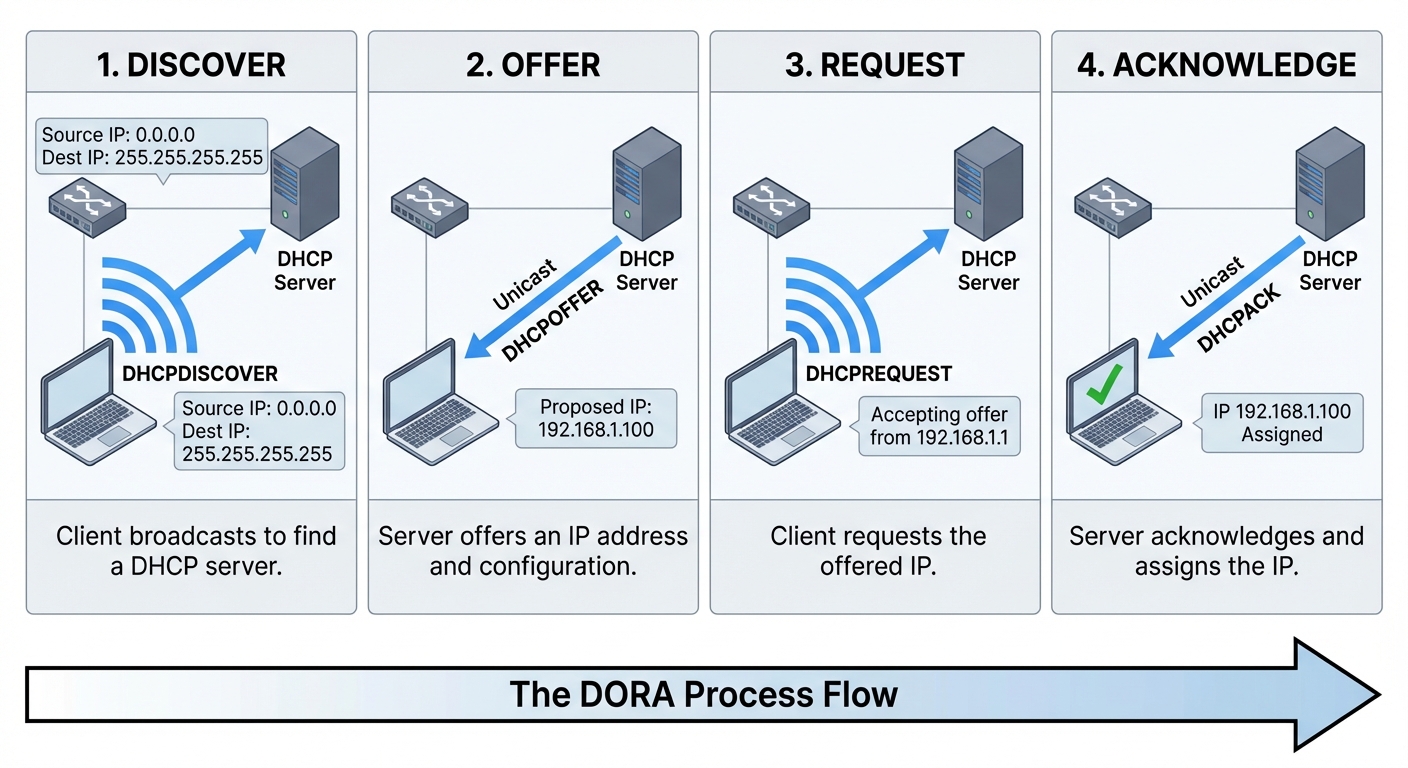
DHCP uses a four-step process to assign IP addresses to clients. This process is commonly remembered by the acronym DORA: Discover, Offer, Request, Acknowledge.
The DORA Process
1. Discover
When a device connects to a network and needs an IP address, it sends a DHCPDISCOVER message as a broadcast. Since the client doesn't yet have an IP address, it uses 0.0.0.0 as its source address and 255.255.255.255 (the broadcast address) as the destination. This message reaches all devices on the local network segment, including any DHCP servers.
2. Offer
Any DHCP server that receives the DHCPDISCOVER message and has available IP addresses responds with a DHCPOFFER message. This offer includes a proposed IP address, subnet mask, lease duration, and the server's IP address. If multiple DHCP servers exist on the network, the client may receive multiple offers.
3. Request
The client selects one of the offers (typically the first one received) and broadcasts a DHCPREQUEST message. This message indicates which server's offer the client has accepted and serves to inform other DHCP servers that their offers were declined. The broadcast nature ensures all servers on the network know the outcome.
4. Acknowledge
The selected DHCP server responds with a DHCPACK message, confirming the IP address assignment and providing all configuration parameters. At this point, the client can begin using the assigned IP address. If something goes wrong, the server may send a DHCPNAK (negative acknowledgment), and the client must restart the process.
Lease Duration and Renewal
DHCP assigns IP addresses for a specific period called the lease time. This temporary assignment ensures IP addresses return to the available pool when devices leave the network.
Key lease timing:
- T1 (50% of lease): The client attempts to renew the lease by contacting the original DHCP server directly (unicast).
- T2 (87.5% of lease): If renewal fails, the client broadcasts a renewal request to any available DHCP server.
- Lease expiration: If no renewal occurs, the client loses its IP address and must restart the DORA process.
Common lease durations range from 8 hours in dynamic environments (like coffee shops) to 8 days or longer in stable office networks. The appropriate lease time depends on how frequently devices join and leave the network.
DHCP Configuration Parameters
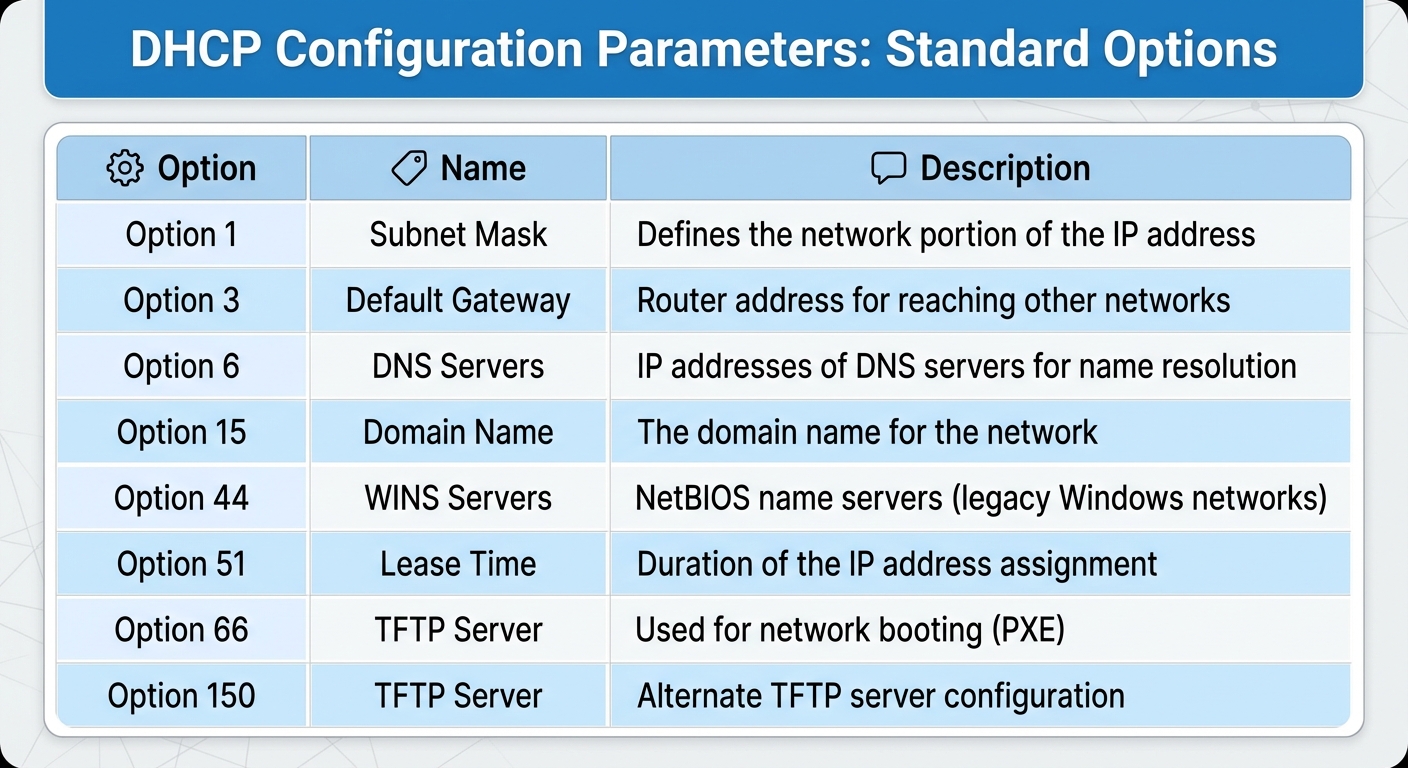
DHCP provides much more than just IP addresses. A DHCP server can deliver a comprehensive set of network configuration parameters to clients.
Standard DHCP Options
Cisco-specific option for VoIP phone configuration
Scope Configuration
A DHCP scope defines the range of IP addresses available for assignment along with associated configuration options. When configuring a DHCP scope, administrators must define:
- Address range: The starting and ending IP addresses in the pool
- Subnet mask: The network mask for the assigned addresses
- Exclusions: IP addresses within the range that should not be assigned (reserved for servers, printers, etc.)
- Lease duration: How long clients can use assigned addresses
- Options: Gateway, DNS servers, and other parameters
DHCP Reservations vs. Static Assignments
Network devices that require consistent IP addresses can be configured in two ways: DHCP reservations or static (manual) configuration.
DHCP Reservations
A DHCP reservation binds a specific IP address to a device's MAC address. When that device requests an address, the DHCP server always assigns the same IP. Benefits include:
- Centralized management of all IP assignments
- Device still receives other DHCP options (gateway, DNS)
- Easier to update network-wide settings
- No need to configure the device itself
Static IP Configuration
Static configuration involves manually setting the IP address directly on the device. This approach is appropriate when:
- The device must function even if the DHCP server is unavailable
- The device is the DHCP server itself
- Security policies require static assignment
- The device doesn't support DHCP (rare in modern equipment)
Best practice: Use DHCP reservations for servers, printers, and network devices whenever possible. This maintains centralized control while ensuring consistent addressing.
DHCP Relay and Multiple Subnets
DHCP discover messages are broadcasts, which routers do not forward by default. This creates a challenge for networks with multiple subnets: how can devices on different subnets reach the DHCP server?
DHCP Relay Agent
A DHCP relay agent (also called an IP helper) solves this problem by listening for DHCP broadcasts on local subnets and forwarding them as unicast packets to a DHCP server on another subnet.