Plug in a network cable and it either works or it doesn't, and when it doesn't, the cause is often something you can't see on the jacket. A cable that runs a laptop fine at 100 megabits might choke a server link that needs ten gigabits, and a run that's ten meters too long can fail intermittently in ways that look like a bad switch. Knowing what a cable can actually carry, and how far, is what separates a guess from a diagnosis.
CompTIA A+ Core 1 (220-1201) covers this under the Networking domain, in the objectives on network cabling and physical connections. The exam expects you to match cable types and categories to their supported speeds and maximum distances, recognize Ethernet standard names, and know when copper stops being enough and fiber takes over. This article walks through what determines speed and distance, the numbers you're expected to memorize, and the field mistakes that turn a simple cable run into an afternoon of troubleshooting.
Speed and distance come from three things working together
An Ethernet link's speed and reach aren't set by the cable alone. Three pieces have to agree: the Ethernet standard the equipment runs, the cable's category or grade, and the physical medium (copper or fiber). The slowest or weakest of the three sets your real-world result.
Think of it the way you'd think about a delivery route. The truck is your networking equipment, the road is the cable, and the speed limit posted on that road is the cable's rating. A fast truck on a slow road still moves at the road's limit. In the same way, a 10-gigabit switch port connected with old Category 5 cable won't deliver 10 gigabits, because the cable can't carry the signal cleanly at that frequency.
This matters on the job because people replace the wrong component. A user complains their gigabit connection only negotiates at 100 megabits, and the tech swaps the switch, the NIC, and the wall jack before checking the cable in the ceiling that someone pulled in 2004. In exam terms, when a question gives you a speed requirement and a distance, you're being asked to pick the cheapest medium and category that satisfies both. Always read for the limiting factor.
The 100-meter rule is the anchor for all copper
Every twisted-pair copper Ethernet standard shares one hard limit: 100 meters, or about 328 feet, for a single run. This number appears constantly on the exam, and it's the first thing to lock in. It applies to 10BASE-T, 100BASE-T, 1000BASE-T, and 10GBASE-T on properly rated cable.
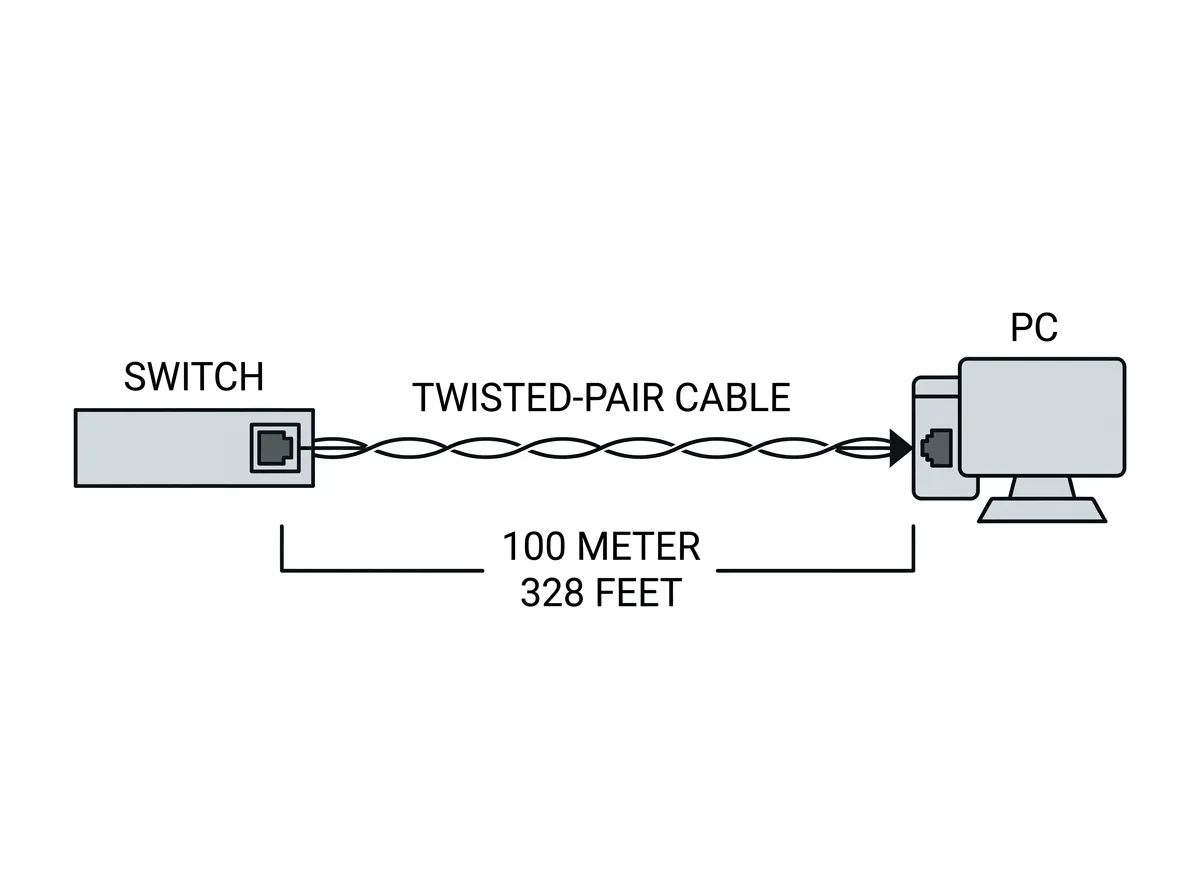
That 100 meters isn't all one cable, and understanding the breakdown helps you troubleshoot real installations. The standard model divides it into 90 meters of solid-core horizontal cabling running through walls and ceilings, plus a 10-meter budget for stranded patch cords on each end (the cable from the wall jack to the PC, and the cable from the patch panel to the switch). Solid-core wire is used in the walls because it carries signal better over distance; stranded patch cords are more flexible and survive being moved and bent.
The reason for the limit is signal attenuation and timing. Electrical signals weaken as they travel down copper, and the Ethernet protocol depends on signals arriving within a predictable window. Push past 100 meters and you get attenuation, increased error rates, and links that drop or downgrade. A link might still come up, then fail under load, which is one of the most frustrating symptoms to chase because intermittent problems don't show up in a quick test.
A common field gotcha: the cable run measured along the wall looks like 80 meters, but nobody accounted for the vertical runs up into the ceiling, the slack coiled above the tile, and the patch cords on both ends. Those add up. If a link is unstable and long, measure the real path, not the floor plan distance.
Cable categories set the copper speed ceiling
The category printed on a twisted-pair cable's jacket tells you the bandwidth it's certified to handle, measured in megahertz, and by extension the Ethernet speed it can support. Higher categories use tighter twists, better insulation, and sometimes shielding to fight crosstalk and interference at higher frequencies. For the A+ exam, you should know the following categories and what they support at the standard 100-meter distance.
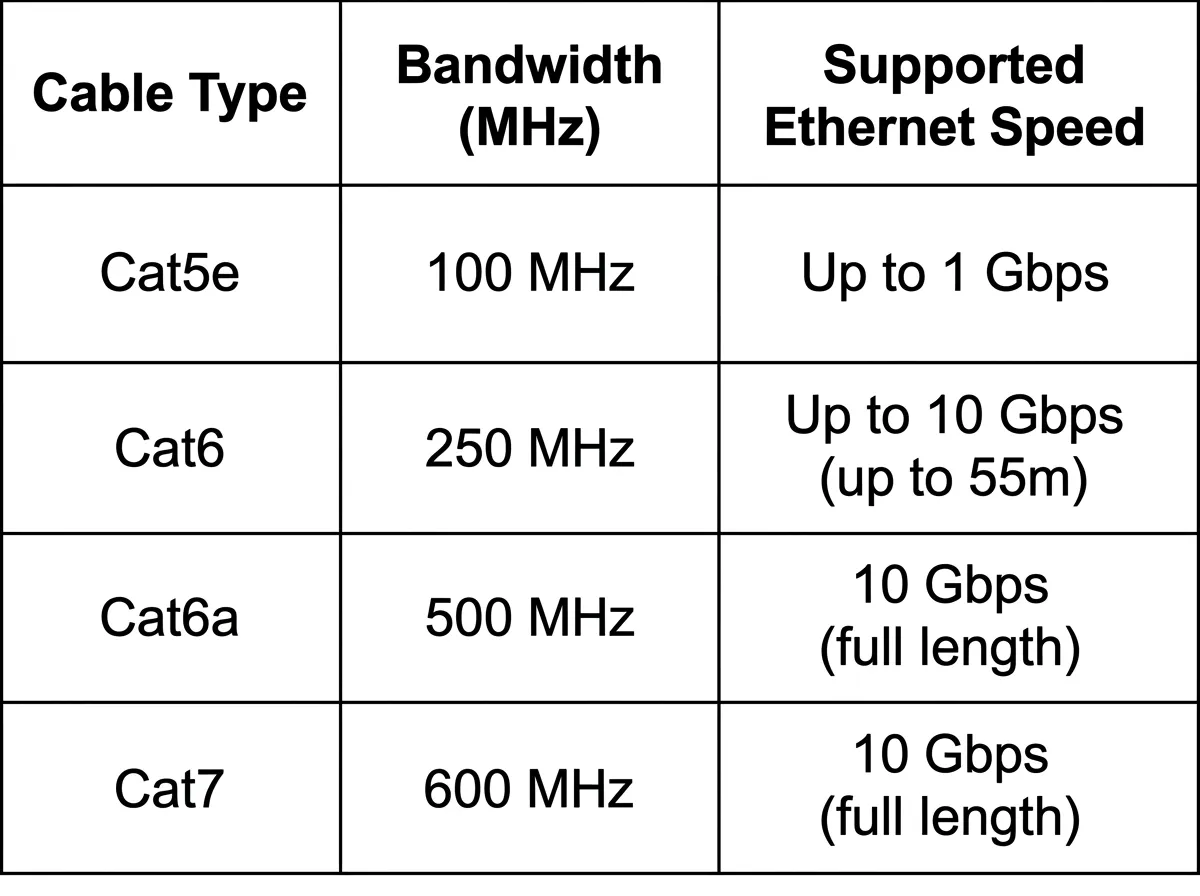
Category 5 (Cat 5) is legacy cabling rated to 100 MHz and supports 100BASE-T at 100 Mbps. You'll still find it in older buildings, and it's a frequent cause of links that won't run at gigabit speed. It's obsolete for new installs.
Category 5e (Cat 5e), the "enhanced" version, is also rated to 100 MHz but with tighter specifications on crosstalk. It supports 1000BASE-T, gigabit Ethernet, at the full 100 meters. This is the practical baseline for most existing office cabling.
Category 6 (Cat 6) is rated to 250 MHz. It supports gigabit at 100 meters like Cat 5e, but its real advantage is 10-gigabit support at a reduced distance. Cat 6 can run 10GBASE-T only up to about 55 meters, and even that depends on how much interference (called alien crosstalk) comes from surrounding cables in the bundle.
Category 6a (Cat 6a), "augmented" Cat 6, is rated to 500 MHz and supports 10GBASE-T at the full 100 meters. This is the go-to choice today when you need 10 gigabits over copper across a normal building run. The cable is thicker and stiffer than Cat 6, which matters for cable management in tight spaces.
Category 7 (Cat 7) is rated to 600 MHz and is fully shielded, but it uses non-standard connectors (GG45 or TERA) and was never adopted by the mainstream Ethernet standards bodies the way the other categories were.