Every network needs something that decides which traffic gets through and which gets stopped. Without that gatekeeper, any device on the internet could reach straight into your systems. A firewall is the device or software that enforces those rules, and it's one of the first things a technician checks when traffic isn't flowing the way it should.
CompTIA A+ Core 1 (220-1201) Objective 2.5 lists the firewall among the common network devices you're expected to recognize. For the exam, you need to know what a firewall does, where it sits, the difference between hardware and software firewalls, and how it uses rules to permit or deny traffic. This article stays focused on what a working technician actually configures and troubleshoots.
A firewall filters traffic against a set of rules
A firewall inspects network traffic and compares it against rules you define, then permits or blocks each packet based on the outcome. That's the core function. Everything else is a variation on how deeply it inspects the traffic and where it runs.
The rules usually reference a few pieces of information: the source IP address, the destination IP address, the protocol (TCP, UDP, or others), and the port number. A rule might say "allow inbound TCP traffic on port 443" or "block all inbound traffic from this IP range." The firewall reads its rule list, finds the first match, and applies that action.
Two behaviors matter here. Most firewalls process rules in order, top to bottom, and stop at the first match. Most also end with an implicit deny, meaning any traffic that doesn't match an allow rule is blocked by default. In exam terms, if traffic isn't explicitly permitted, assume it's denied. This is why adding a service often means adding a rule to allow it, not removing a rule that blocks it.
Firewalls sit at the network edge or on the host itself
Where a firewall runs changes what it can protect. There are two placements you need to know.
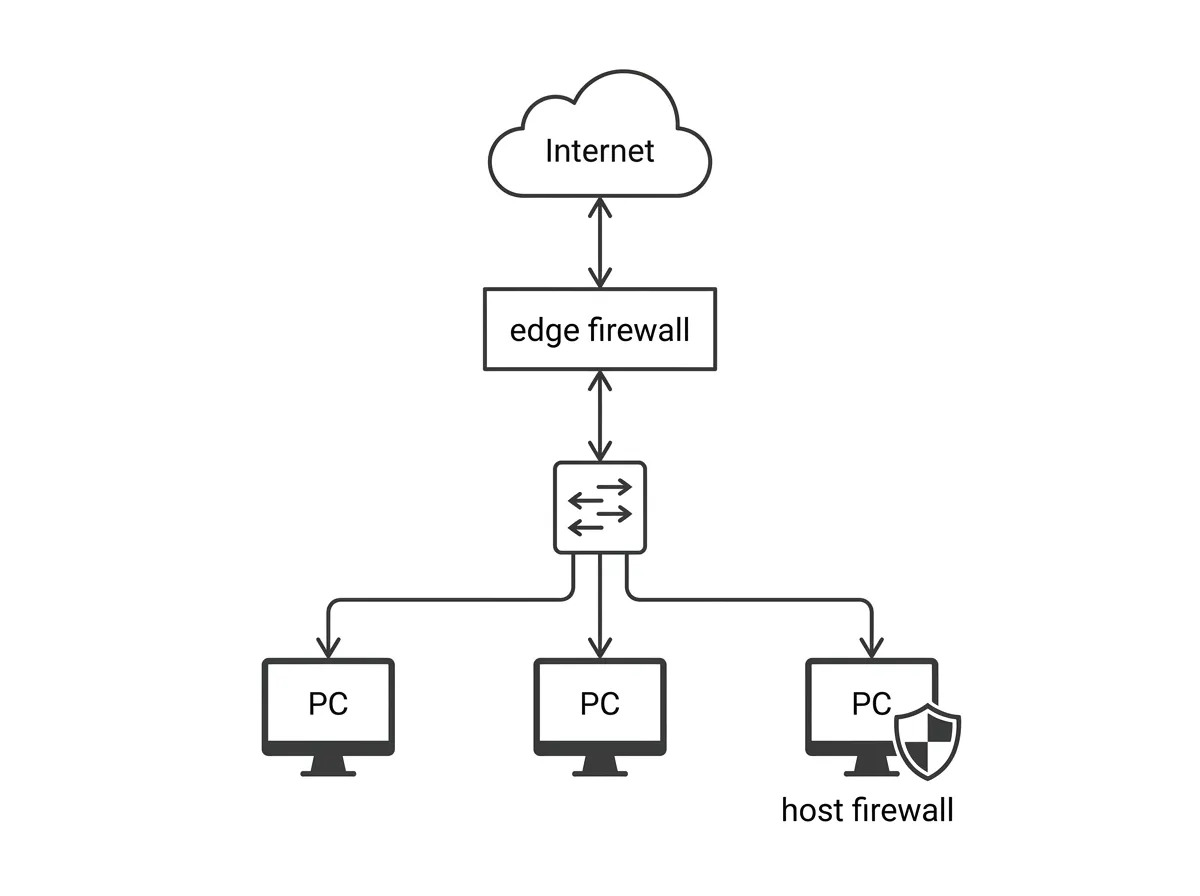
A network-based firewall sits at the boundary between your local network and the outside world, most often between the LAN and the internet. It protects every device behind it at once. In homes and small offices, this function is usually built into the router or gateway. In larger environments it may be a dedicated appliance. Because all traffic between the network and the internet passes through it, a single set of rules can protect dozens or hundreds of machines.
A host-based firewall runs as software on an individual computer and protects only that one device. Windows Defender Firewall is the example you'll see most often, and macOS and Linux have their own equivalents. A host-based firewall is useful because it protects the machine even when the traffic comes from another device on the same local network, which a network firewall at the edge never sees.
These two aren't competitors. Good practice uses both: the network firewall filters traffic entering and leaving the network, and the host firewall adds a second layer on each machine. That layered approach is what security teams call defense in depth, and it's a common exam theme.
Hardware and software firewalls do the same job in different packages
The terms hardware firewall and software firewall describe how the firewall is delivered, not a fundamental difference in what filtering means.
A hardware firewall is a physical device dedicated to filtering traffic, or firewall functionality built into a router or gateway. It runs on its own hardware, so it doesn't consume resources on your computers, and it can protect the whole network from a single point.