A gateway is a critical networking component that enables devices on one network to communicate with devices on a different network. In most modern environments, the term “gateway” refers to the device or network address that provides access from a local network to external networks, including the internet. Without a gateway, devices would be limited to communicating only with other systems on the same local network.
Gateways exist because networks are divided into separate logical groups, each with its own addressing scheme and rules for communication. While devices on the same local network can communicate directly, communication beyond that network requires an intermediary that understands how to forward traffic appropriately. For CompTIA A+ technicians, understanding gateways is essential because incorrect gateway configuration is one of the most common causes of internet and network connectivity failures.
Core Concept of a Gateway
In practical terms, a gateway acts as a transition point between networks that use the Internet Protocol (IP). When a device needs to communicate with another device that is not on its local network, it sends the data to the gateway. The gateway then determines where the data should go next and forwards it toward its destination.
On most networks, the gateway is implemented as a router. A router is a networking device designed to connect multiple networks and route traffic between them. In home and small business environments, the router provided by the Internet Service Provider (ISP) typically serves as the default gateway for all connected devices. This router connects the internal private network to the external public internet.
The gateway is identified to devices by an IP address known as the default gateway. This address is part of the device’s IP configuration and tells the device where to send traffic that is destined for outside its local subnet. If the default gateway is missing or incorrect, the device may still communicate with nearby devices but will be unable to reach external networks.
The word “default” is meaningful here. It is the route of last resort: the address a host uses for any destination it does not otherwise have a specific route for. On a simple client, essentially every destination outside the local subnet is “everything else,” so the default gateway handles all off-network traffic. In a routing table this is expressed as the destination 0.0.0.0/0, meaning “match any address,” pointed at the gateway’s IP.
How a Host Decides Local vs. Remote
Every time a host sends a packet, it must answer one question first: is the destination on my own subnet, or somewhere else? The host answers this by combining its own IP address and subnet mask with the destination IP address. The subnet mask marks which portion of an address is the network and which portion is the host. The device performs a bitwise AND of its IP with the mask to find its own network number, does the same with the destination address, and compares the two results.
If the two network numbers match, the destination is local. The host resolves the destination’s MAC address with ARP and delivers the frame directly on the LAN, and the gateway is never involved. If the network numbers differ, the destination is remote. The host cannot reach it directly, so it sends the frame to the default gateway’s MAC address instead, trusting the gateway to forward it onward. Critically, the host still ARPs for the gateway, not the far-away destination, which is why an unreachable gateway shows up as an immediate failure for all outside traffic.
A concrete example: a host at 192.168.1.50 with mask 255.255.255.0 (a /24) treats 192.168.1.0 through 192.168.1.255 as local. Traffic to 192.168.1.20 goes out directly. Traffic to 8.8.8.8 is off-subnet, so it goes to the default gateway, typically 192.168.1.1. Change that mask to 255.255.0.0 and the host now considers all of 192.168.x.x local, which changes what it will and will not send to the gateway. This is why a mismatched subnet mask produces connectivity symptoms that look like a gateway problem.
How a Gateway Works Step by Step
When a device wants to send data, it first determines whether the destination IP address is on the same local network. This decision is made by comparing the destination IP address to its own IP address using the subnet mask. If the destination is local, the device sends the data directly to the target device.
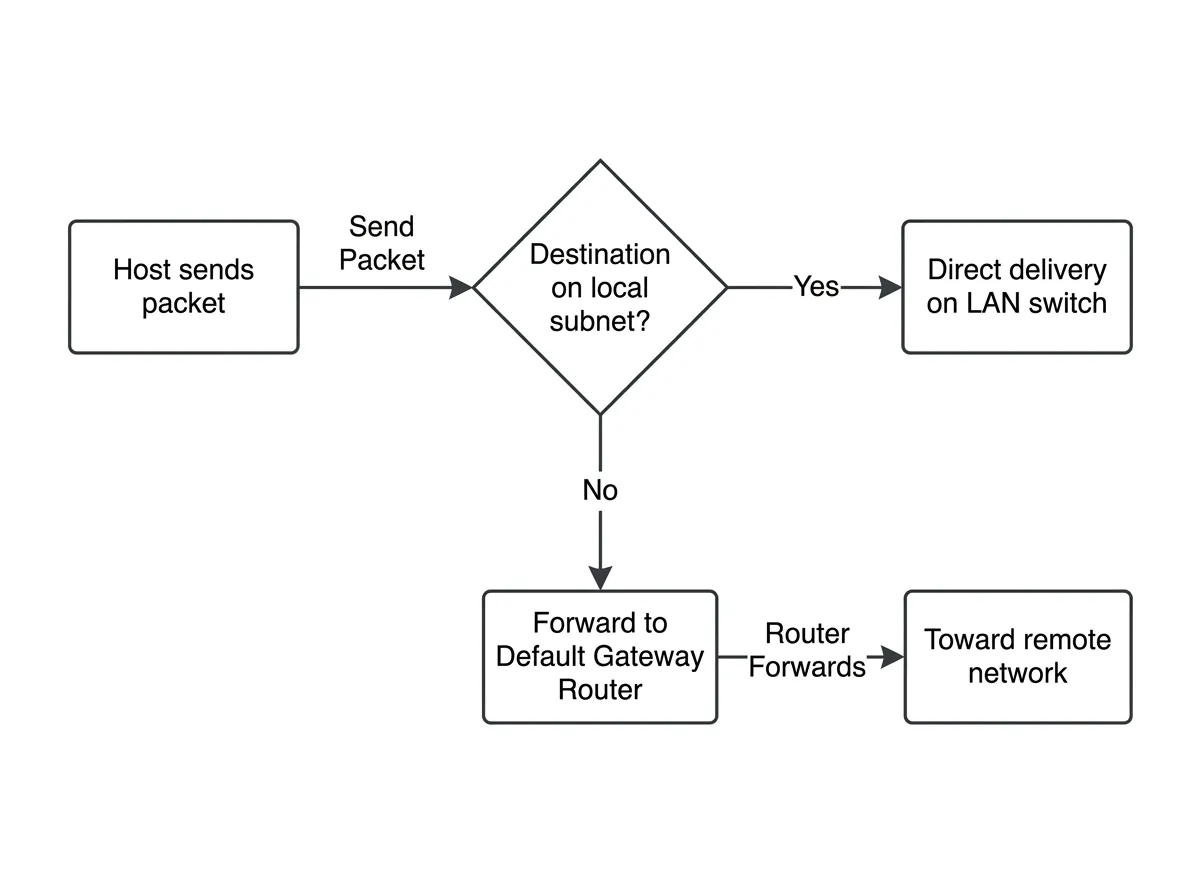
If the destination is not local, the device forwards the data to the default gateway. The gateway receives the data packet, examines the destination IP address, and consults its routing table, which is a set of rules that determine where traffic should be sent next. Based on this information, the gateway forwards the packet toward the appropriate network, often passing it along to another router or directly to the internet.
This process repeats as the packet moves across multiple gateways until it reaches the destination network. When a response is sent back, the process occurs in reverse, ensuring two-way communication between networks.
Gateway and IP Configuration
The default gateway is one of four core IP configuration settings required for full network communication. The others are the IP address, subnet mask, and DNS server address. While the IP address identifies the device and the subnet mask defines the local network boundary, the gateway defines the exit point from the local network.
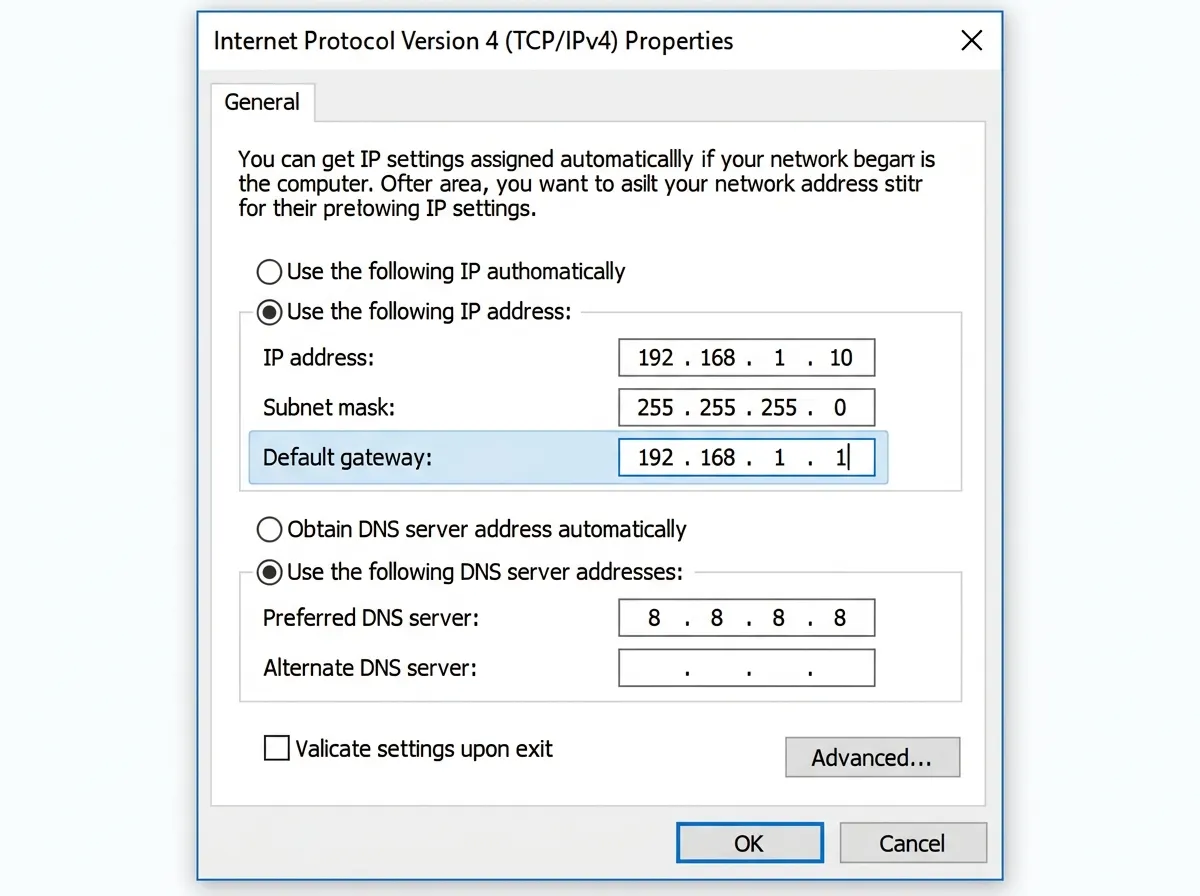
In most environments, the default gateway address is the IP address of the router’s internal network interface. For example, in a typical home network using the 192.168.1.0 network, the gateway address is often 192.168.1.1. All devices on the network are configured to send external traffic to this address.
A rule that trips up beginners: the default gateway must be an address on the same subnet as the host itself. A host at 192.168.1.50/24 cannot use a gateway of 10.0.0.1, because it has no direct way to reach an address outside its own network. The gateway is the one off-host device a client must be able to talk to directly, so it always lives inside the local subnet.