Every device on a network needs an address, the same way every house on a street needs a number so mail arrives at the right door. Give two houses the same number and letters go astray; leave a house with no number and nothing reaches it at all. IPv4 addressing is the numbering system that keeps network traffic going to the correct device.
CompTIA A+ Core 1 (220-1201) Objective 2.6 covers IP addressing and SOHO networks. The exam expects you to recognize IPv4 address formats, tell public addresses apart from private ones, know when to use static versus dynamic assignment, and understand the supporting pieces like subnet masks, gateways, DHCP, and APIPA. This article walks through each of those in the order a technician actually meets them on the job.
An IPv4 address is 32 bits written as four decimal numbers
An IPv4 address is a 32-bit number. To make it readable, we split those 32 bits into four 8-bit groups called octets and write each octet as a decimal number separated by dots. That's the familiar dotted-decimal format, such as 192.168.1.50.
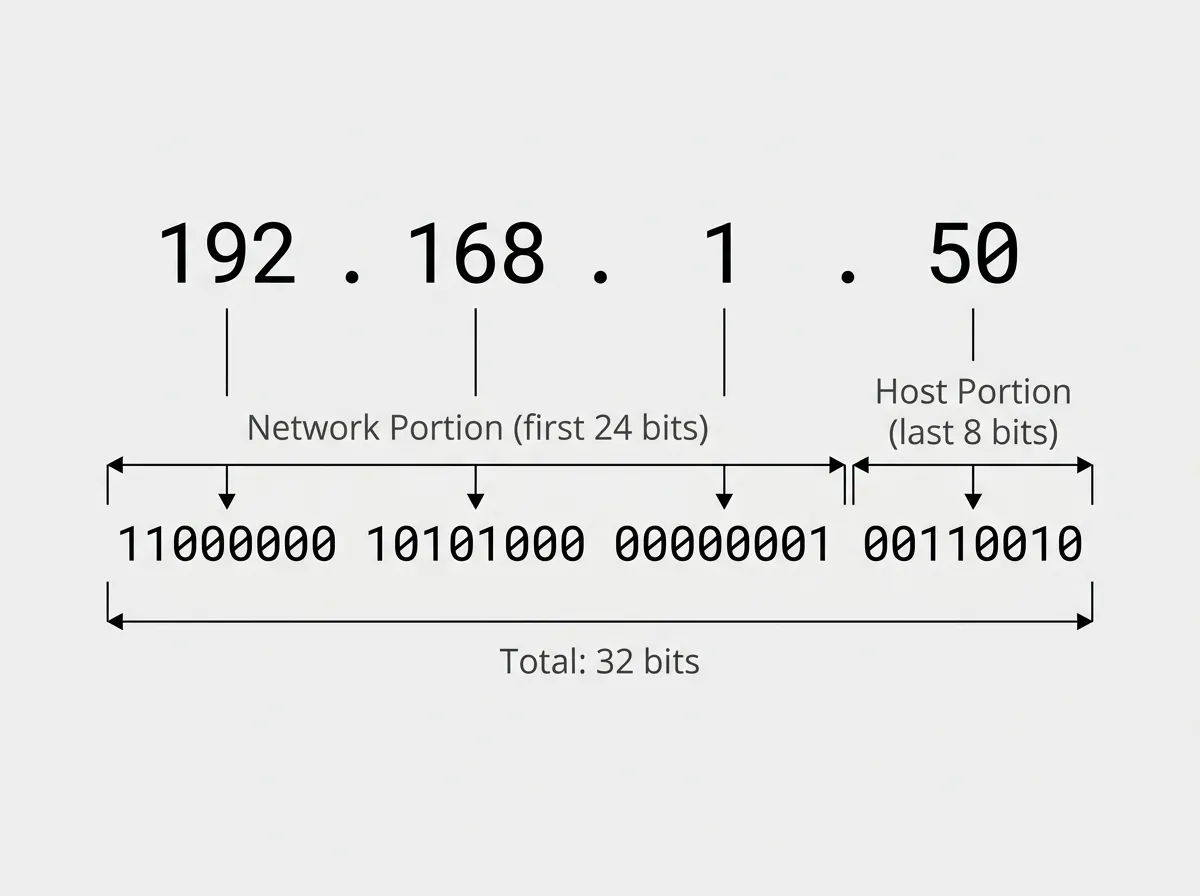
Because each octet holds 8 bits, its value can range from 0 to 255. That's why you'll never see a valid IPv4 octet like 256 or 300. If a user hands you an address with an octet above 255, you already know it's typed wrong before you check anything else.
An IP address by itself isn't enough. It always travels with a subnet mask, which tells the device which part of the address identifies the network and which part identifies the host. A common mask is 255.255.255.0, sometimes written in CIDR notation as /24. That mask means the first three octets are the network portion and the last octet identifies individual devices on that network.
Two devices can only talk directly when they share the same network portion. If a workstation is 192.168.1.50 with a /24 mask and a printer is 192.168.2.10, they're on different networks and can't reach each other without a router in between. In exam terms, when a device can reach some machines but not others, mismatched subnets or masks are one of the first things to suspect.
The third piece is the default gateway. This is the IP address of the router that a device sends traffic to when the destination is on a different network. Without a correct gateway, a computer can talk to its local neighbors but can't reach the internet. On the job, a device that loads internal resources but can't browse the web often has a missing or wrong gateway.
Public addresses route on the internet, private addresses stay inside
Not every IPv4 address is meant to be seen by the whole internet. The address space is divided into public and private ranges, and knowing which is which is a core exam skill.
A public IP address is globally unique and routable across the internet. Your internet service provider assigns one (or more) to your connection, and it's how the outside world reaches you. Public addresses are a limited resource, which is a big reason private addressing exists.
A private IP address is used inside a local network and is not routable on the public internet. Routers on the internet are configured to drop private addresses, so they can be reused in millions of homes and offices at the same time without conflict. The private ranges are defined by RFC 1918, and you should memorize them.
| Class | Private range | Block (CIDR) | Typical use |
|---|---|---|---|
| A | 10.0.0.0 – 10.255.255.255 | /8 (255.0.0.0) | Large enterprise networks |
| B | 172.16.0.0 – 172.31.255.255 | /12 (255.240.0.0) | Medium networks |
| C | 192.168.0.0 – 192.168.255.255 | /16 (255.255.0.0) | Home and SOHO networks |
The Class B range trips people up most often. It's 172.16 through 172.31, not the whole 172 block. An address like 172.20.5.4 is private, but 172.40.5.4 is not. Expect the exam to test that boundary directly.
NAT is what lets private addresses reach the internet
If private addresses can't route on the internet, how does a home PC on 192.168.1.50 load a web page? The answer is Network Address Translation. Your router replaces the device's private source address with the router's single public address on the way out, then reverses the swap when the reply comes back. This lets many private devices share one public address.
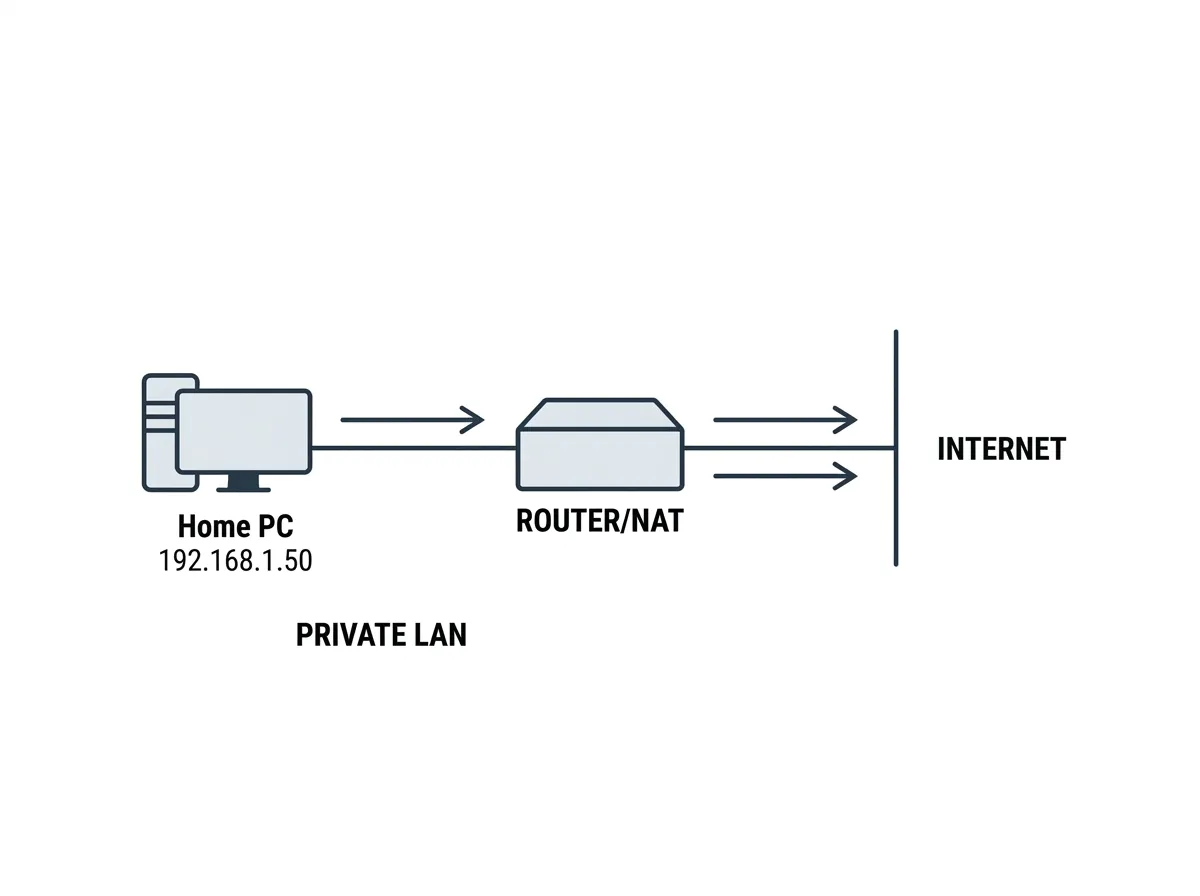
You don't need to configure NAT by hand on a typical SOHO router, but you should understand what it does. When a technician sees a whole office of 192.168.x.x machines browsing the internet just fine, NAT on the router is the reason it works.
Static addressing is set by hand, dynamic addressing is handed out automatically
Every device gets its IP configuration one of two ways. Either a person types it in, or a server hands it out. This is the static versus dynamic distinction, and choosing correctly is part of the job.
A static IP address is configured manually and doesn't change. You enter the address, subnet mask, default gateway, and DNS servers yourself. Static addressing makes sense for devices that other machines need to find reliably at a fixed location: servers, network printers, routers and switches, security cameras, and anything you'll forward ports to. If a printer's address kept changing, users would lose their ability to print until someone reconfigured it.
A dynamic IP address is assigned automatically by a DHCP server, usually built into the SOHO router. The device asks for a configuration when it connects, receives one from a pool of available addresses, and uses it for a set period called a lease. Dynamic addressing is the default for most client devices because it scales well and prevents human error. You don't have to track which addresses are in use, and you can't accidentally assign the same address twice.
The main risk with static addressing is a duplicate address conflict. If you manually assign an address that DHCP later hands to another device, both machines lose reliable connectivity, and you'll usually see a duplicate-address warning.