Open two prebuilt PCs and you'll often find one with a tidy bundle of cables and one with a tangle stuffed behind the drive cage. A big reason for that difference is how the power supply attaches its cables. That single design choice affects airflow, build time, and how easy the machine is to service later.
CompTIA A+ Core 1 (220-1201) Objective 3.6 covers power supplies, and it expects you to recognize modular, semi-modular, and non-modular designs, along with the practical trade-offs of each. In exam terms, you should be able to look at a scenario and say which cabling style fits, and explain why. On the job, this knowledge saves you time during builds and helps you troubleshoot power problems without fighting a mess of unused cables.
Modularity describes how cables attach, not how much power you get
A power supply's modularity refers to whether its output cables are permanently attached or plug into sockets on the unit. It has nothing to do with wattage, efficiency rating, or voltage. A 500-watt supply and a 1000-watt supply can both be fully modular, and modularity by itself never makes a PSU more powerful.
What modularity does control is which cables are present in the case. A power supply provides several cable types: the 24-pin main board connector, the 4+4-pin CPU (EPS) connector, PCIe power for graphics cards, SATA power for drives, and older Molex connectors for fans and legacy devices. Depending on the build, many of those cables go unused. Modularity decides whether those unused cables are hanging inside the case or sitting in a spare parts bag.
That's the core idea to hold onto. When you compare the three types below, you're really comparing how much cable clutter you're forced to keep and how much flexibility you have to remove what you don't need.
The three cabling types differ by which cables you can remove
There are three designs you need to recognize. The difference between them is simple: how many cables are hardwired versus detachable.
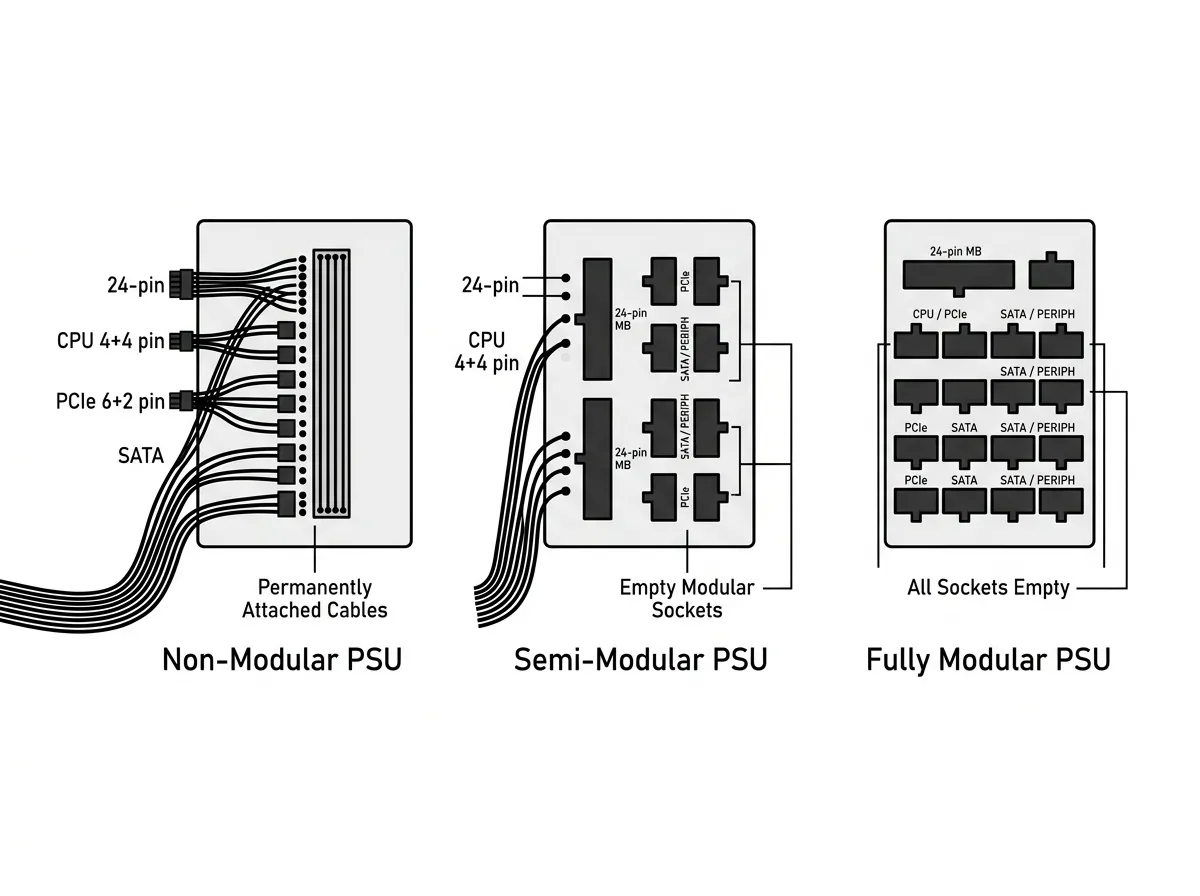
| Type | Hardwired cables | Detachable cables |
|---|---|---|
| Non-modular | All cables | None |
| Semi-modular | 24-pin and CPU | PCIe, SATA, Molex |
| Fully modular | None | All cables |
A non-modular power supply has every cable permanently attached at the factory. You get the full bundle whether you need it or not, and unused cables must be tucked away somewhere inside the case.
A semi-modular power supply hardwires the cables that nearly every system uses anyway, the 24-pin motherboard connector and the CPU power connector, and lets you attach the rest as needed. This is a common middle ground because those two cables are required in essentially every build.
A fully modular power supply attaches nothing at the factory. Every cable, including the 24-pin, plugs into a socket on the PSU. You install only the cables the build requires.
Fully modular units keep unused cables out of the case
The main benefit of a modular design is cleaner cable management. When you can leave unused SATA and PCIe cables in the box, the inside of the case stays open. That improves airflow, because loose cable bundles block the paths that intake and exhaust fans depend on. It also makes the build easier to photograph, inspect, and service.
For a technician, that clean layout pays off during repairs. When you open a fully modular system to add a drive, you route one new SATA cable instead of digging for a spare connector buried in a hardwired bundle. If a cable is damaged, you can often replace just that cable rather than the whole unit.
Fully modular units carry two honest trade-offs. They usually cost more than comparable non-modular models, and you must keep track of the detachable cables. Lose the box of cables and a future upgrade gets harder. Semi-modular designs reduce cost while keeping most of the flexibility, which is why they show up so often in mainstream builds.
How to pick a cabling style on the job
The three designs map cleanly onto real build decisions. Use this as a quick reference when a scenario asks which style fits.
| Design | Relative cost | Best fit |
|---|---|---|
| Non-modular | Lowest | Budget builds, prebuilts, roomy cases where clutter is hidden and cost is the priority |
| Semi-modular | Middle | Mainstream desktops that want most of the tidiness without paying full price |
| Fully modular | Highest | Small-form-factor cases, showcase builds with glass panels, and systems that get serviced or upgraded often |
A useful way to think about it: modularity is a convenience and serviceability feature, not a performance feature. A technician chooses fully modular when interior space is tight, when airflow is already marginal, or when the machine will be opened and reconfigured regularly. When the budget is the priority and the case has plenty of room to hide a hardwired bundle behind the motherboard tray, non-modular is a perfectly valid, and cheaper, choice that delivers the exact same power.
What the connectors look like on the PSU side
On a modular unit, the back of the PSU has a row of labeled sockets. These are typically grouped so that different pin counts serve different jobs: a large socket for the 24-pin motherboard cable, smaller sockets marked CPU or EPS for processor power, and several marked PCIe, VGA, or SATA/peripheral for the remaining rails. Many modern high-wattage units also include a dedicated 12VHPWR / 12V-2x6 socket that feeds a single 16-pin cable to recent high-power graphics cards.