Every network you touch eventually needs to reach a network it isn't part of. A home PC needs the internet, a branch office needs the headquarters server, and a phone on Wi-Fi needs a cloud service running in a data center. The device that decides how traffic gets from one network to another is the router.
CompTIA A+ Core 1 (220-1201) covers routers under the Networking domain's network devices objective. The exam expects you to know what a router does, how it differs from a switch, the core services a small-office router bundles in, and the ports and features you'll actually configure or troubleshoot. This article stays focused on what a working technician checks: the router's job on the network, its Layer 3 role, the NAT and DHCP services it runs, its physical ports, and the settings that cause the most support calls.
A router connects separate networks and chooses the path between them
A router is a device that moves traffic between two or more different networks. That's the whole job stated plainly. A switch moves frames inside a single network, but a router moves packets between networks that have different IP address ranges. When your laptop on the 192.168.1.0 network needs to reach a web server on the public internet, the router is the device that forwards that traffic out and brings the reply back.
The key idea is that a router operates at Layer 3 of the OSI model, the network layer. It makes decisions based on IP addresses, not MAC addresses. A switch, by contrast, operates at Layer 2 and forwards based on MAC addresses. This distinction shows up constantly on the exam. If a question describes a device that connects two different IP subnets or connects a LAN to the internet, the answer is a router. If it describes a device that connects many computers within the same subnet, the answer is a switch.
Every router has at least two interfaces, and each interface sits on a different network. That's a physical requirement of the job. One side faces your internal network, and another side faces the network you're trying to reach. Traffic enters one interface, the router decides where it should go, and it leaves through another interface. Without at least two networks to bridge, a router has nothing to do.
Because the router sits between networks, it becomes the point where you can watch, filter, and control traffic crossing the boundary. That's why routers so often include firewall features, address translation, and other services. The router is already in the path, so it's the natural place to add these functions.
The default gateway is the router address every host needs
When a device wants to send traffic to another network, it doesn't know the full path. It only knows one thing: send anything that isn't local to the default gateway. The default gateway is the IP address of the router interface on your local network. It's the exit door for all traffic leaving the subnet.
This matters in daily support work because a wrong or missing default gateway is one of the most common causes of "I can get to local resources but not the internet." A PC with a correct IP address and subnet mask can still reach other machines on its own subnet, because that traffic stays local. But the moment it tries to reach anything on a different network, it hands the packet to the default gateway. If that address is blank or points to the wrong device, off-subnet traffic goes nowhere.
On the job, you verify the default gateway with ipconfig on Windows or ip route on Linux. The gateway address almost always sits inside the same subnet as the host. If a host is 192.168.1.50 with a mask of 255.255.255.0, the gateway will usually be something like 192.168.1.1. A gateway address on a different subnet is a configuration error that will break outbound connectivity.
In exam terms, remember the relationship: the default gateway is a router interface, and hosts must be pointed at it to reach anything beyond their local network.
The routing table is how a router decides where packets go
A router keeps a routing table, which is a list of known networks and the interface or next hop used to reach each one. Every time a packet arrives, the router looks up the destination network in this table and forwards the packet accordingly. If it finds a match, it forwards. If it finds no specific match, it uses a default route, which is the router's own version of a default gateway pointing to the next router upstream.
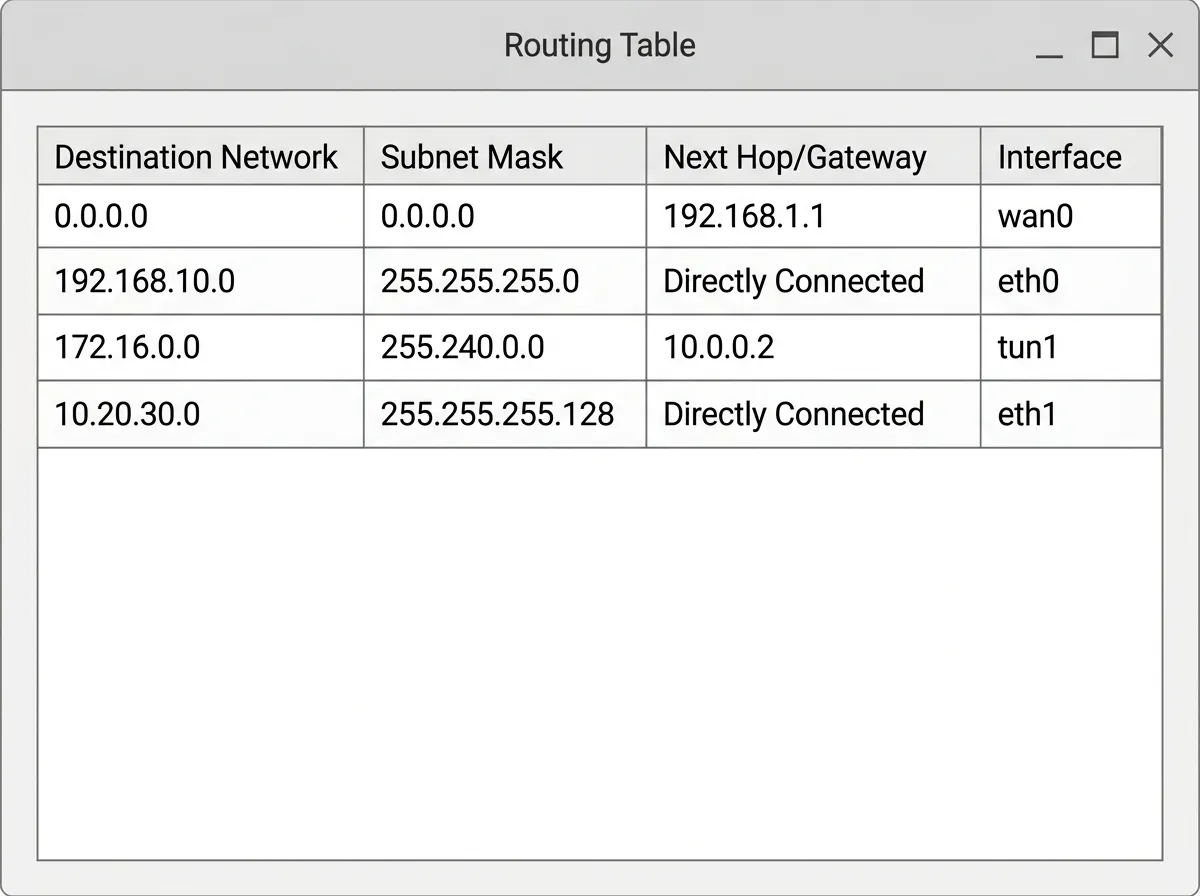
Routes get into the table in two ways. Static routes are entered manually by an administrator. They're simple, predictable, and use no bandwidth to maintain, but they don't adapt if a link fails, and they become tedious on large networks. Dynamic routes are learned automatically through routing protocols, where routers share information about the networks they can reach. Dynamic routing adapts to changes but adds complexity and overhead.
For A+, you don't need to configure routing protocols, but you should recognize the concept. A few names come up: RIP, OSPF, and EIGRP are interior protocols used inside an organization, and BGP is the protocol that routes traffic between large networks across the internet. You won't be asked to configure these, but you may need to recognize that a router uses a routing protocol to build its table dynamically rather than relying only on manual entries.
The practical takeaway is that a router is only as good as its routing table. If a network is missing from the table and there's no default route to fall back on, the router drops the traffic. Many "can't reach that remote site" problems trace back to a missing or incorrect route.
NAT lets many private devices share one public address
Home and office networks use private IP address ranges that aren't valid on the public internet. Those ranges are 10.0.0.0/8, 172.16.0.0/12, and 192.168.0.0/16. You should memorize these, because the exam tests them directly and because you'll recognize them on nearly every network you support. Private addresses let organizations number their internal devices freely, but they can't be routed across the internet.
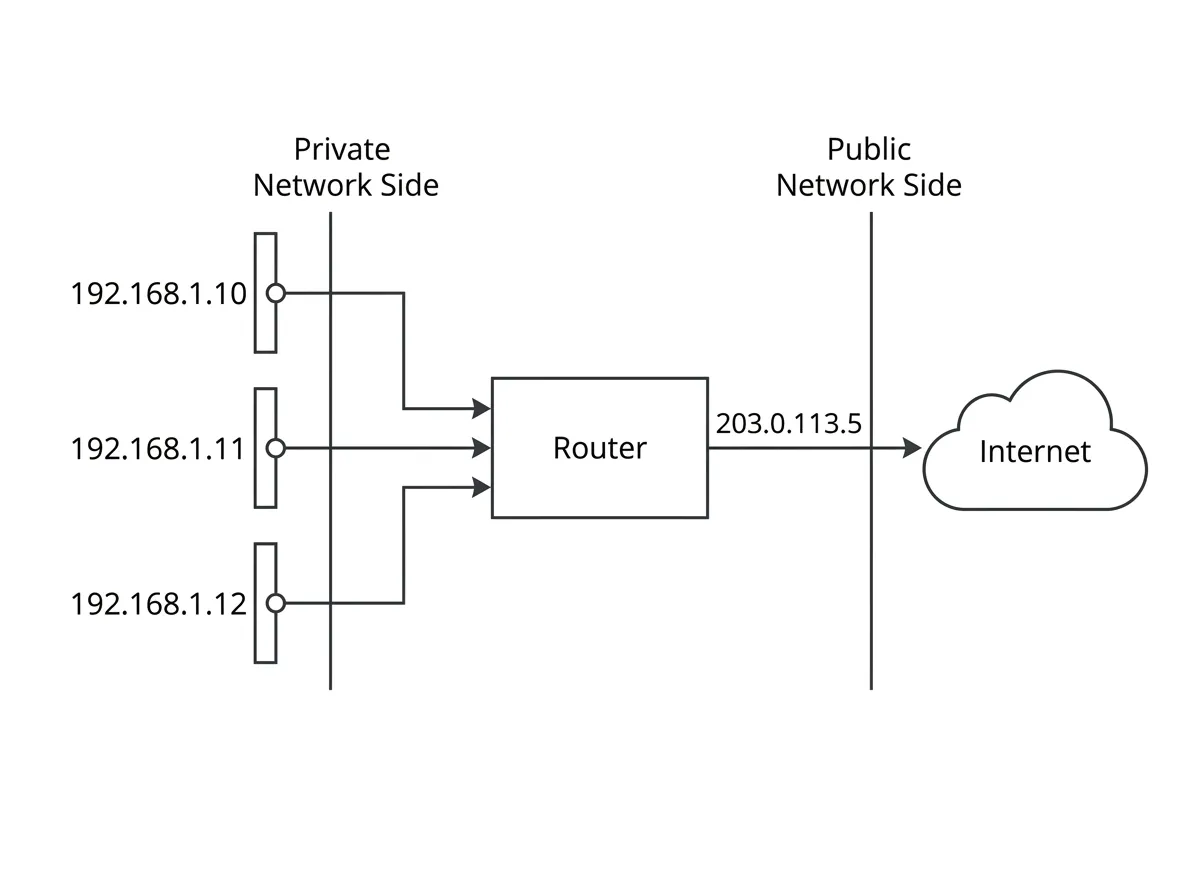
Network Address Translation, or NAT, solves this. The router rewrites the private source address on outbound packets to the router's single public address, and it reverses the process on the replies coming back. To the outside world, all your internal devices appear to share one public IP. This is why a household with a dozen devices needs only one public address from the internet provider.
Most SOHO routers actually use a specific form called Port Address Translation, or PAT, sometimes labeled NAT overload.