A Trusted Platform Module, usually called TPM, is a security feature used to help protect a computer at the hardware level. It is designed to store and protect sensitive security information, such as encryption keys, authentication data, and measurements used to verify that a system has not been tampered with during startup.
A simple way to think about TPM is that it acts like a small security vault inside the computer. Instead of storing important security keys only in software, the system can use TPM to protect them in hardware. This makes it harder for attackers to steal or misuse those keys.
For IT support technicians, TPM is important because it affects operating system security, drive encryption, Secure Boot, Windows installation requirements, and recovery situations.
What Does TPM Stand For?
TPM stands for Trusted Platform Module.
The word trusted means the system can use it to help verify that certain security checks are valid. The word platform refers to the computer system as a whole. The word module refers to the hardware or firmware component that provides this security function.
A TPM may be a physical chip on the motherboard, or it may be built into the system firmware or CPU platform. Either way, the purpose is similar: protect sensitive security information and help verify system integrity.
Why TPM Exists
Computers store sensitive information. This can include passwords, encryption keys, certificates, login tokens, and personal or business data. If this information is not protected well, an attacker may try to steal it, copy it, or use it to bypass security.
TPM helps protect some of this information by keeping certain keys isolated from normal software. This is important because software-based security can sometimes be attacked by malware, unauthorized users, or operating system compromise.
TPM is not a replacement for good security practices, but it adds another layer of protection. It helps the computer prove that it is in a trusted state before allowing certain security features to work.
Physical TPM vs. Firmware TPM
There are different ways TPM can be provided in a computer.
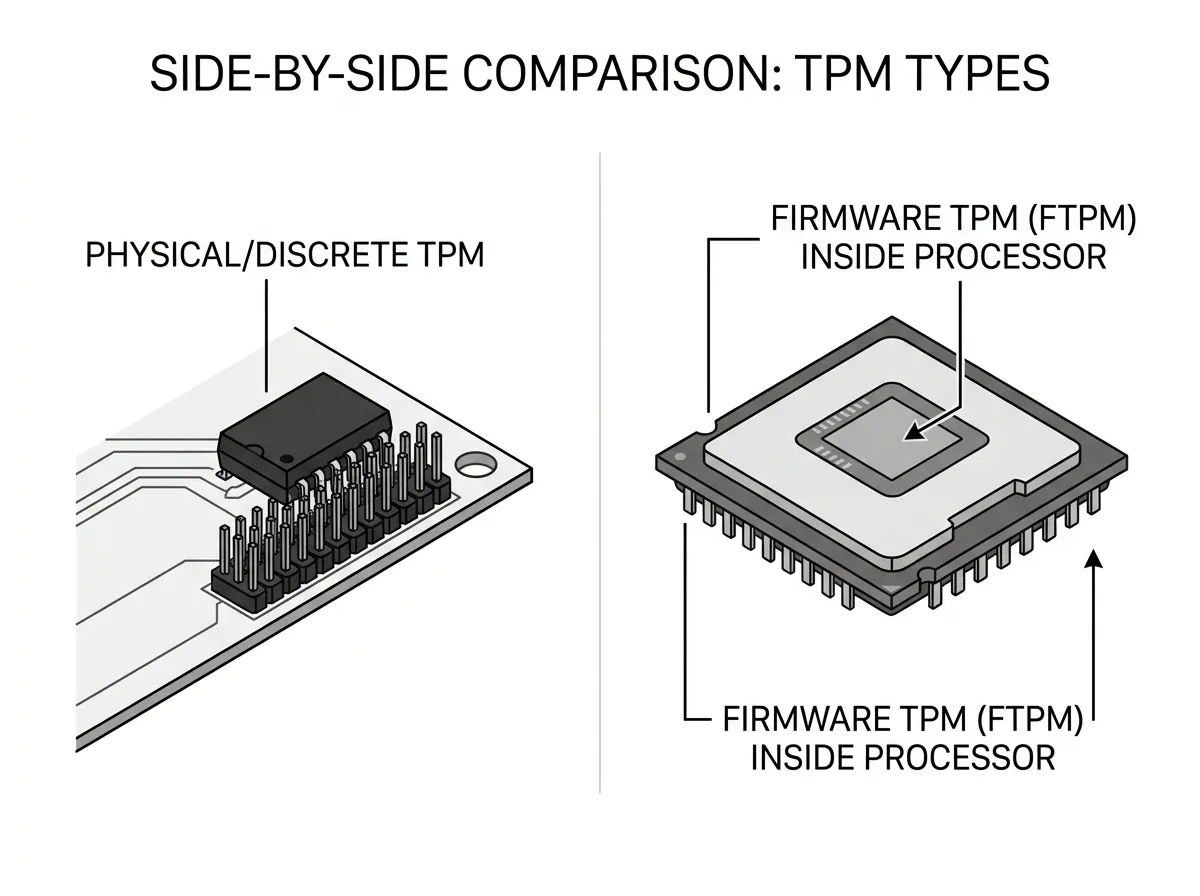
A discrete TPM is a physical chip installed on the motherboard. This chip is dedicated to TPM functions.
A firmware TPM provides TPM functions through system firmware or the CPU platform instead of a separate physical chip. On AMD systems, this may be called fTPM. On Intel systems, it may appear as Intel PTT, which stands for Platform Trust Technology.
For most users and support situations, both physical TPM and firmware TPM serve the same general purpose. The exact name depends on the manufacturer and platform.
In BIOS or UEFI settings, TPM may appear under different labels, such as:
TPM
Security Chip
Trusted Computing
Intel PTT
AMD fTPM
Firmware TPM
This can be confusing for beginners because the setting is not always called “TPM” directly.
TPM and Encryption
One of the most common uses for TPM is drive encryption.
Drive encryption protects data by making it unreadable without the correct key. If someone removes an encrypted drive from a laptop and tries to read it in another computer, the data should remain protected.
TPM can help protect the encryption keys used to unlock the drive. For example, Windows BitLocker can use TPM to verify that the computer has not been changed in a suspicious way before unlocking the drive.
This is useful for laptops, business computers, school devices, and any system that may contain sensitive data. If a device is lost or stolen, encryption with TPM support can help protect the information on the drive.
TPM and BitLocker
BitLocker is Microsoft’s drive encryption feature. It can use TPM to help secure the encryption process.
When BitLocker uses TPM, the TPM helps confirm that the computer’s startup environment has not changed unexpectedly. If everything looks normal, the drive can unlock automatically during startup. If something important changes, BitLocker may ask for a recovery key.
This can happen after certain hardware changes, firmware changes, boot setting changes, motherboard replacements, TPM resets, or Secure Boot changes.
For IT technicians, this is extremely important. Changing TPM, Secure Boot, or boot configuration settings on a BitLocker-protected system can trigger a recovery key prompt. If the recovery key is not available, the user may be locked out of their data.
TPM and Secure Boot
TPM and Secure Boot are different technologies, but they often work together as part of the system’s startup security.
Secure Boot helps make sure that only trusted boot software loads during startup.
TPM helps store security information and verify system integrity.
Together, these features help protect the early boot process. This matters because some malware tries to load before the operating system starts.